Metawidget supports multiple Web frameworks, so that you can choose the one that matches your preferred UI environment.
metawidget-angular.js is a pure AngularJS Metawidget. For an introduction to metawidget-angular.js, see Section 1.3.2, “Web Address Book”.
There are three steps to installing metawidget-angular.js within a web application:
-
Add metawidget-angular.min.js into /lib/metawidget/angular and metawidget-core.min.js into /lib/metawidget/core.
-
Add two script tags to the top of your page:
<script src="lib/metawidget/core/metawidget-core.min.js" type="text/javascript"></script>
<script src="lib/metawidget/angular/metawidget-angular.min.js" type="text/javascript"></script>
-
Add the 'metawidget' module to your AngularJS application:
angular.module( 'myApp', [ 'metawidget' ]);
-
Optionally configure the Metawidget, as described below.
metawidget-angular.js is an AngularJS directive. It can be used simply by:
<metawidget ng-model="foo" />
For compatibility with Internet Explorer 8, a namespaced version of the directive is also available:
<mw:metawidget ng-model="foo" />
For more information on IE8 compatibility see this page. The AngularJS Address Book sample application has also been made compatible with IE8.
metawidget-angular.js is preconfigured with sensible defaults. You can change this configuration by putting a JavaScript object in your $scope and referring to it in the <metawidget> tag:
$scope.metawidgetConfig = {
	inspector: ..., // Configure Inspector
	inspectionResultProcessors: [...], // Configure InspectorResultProcessors
	widgetBuilder: ..., // Configure WidgetBuilder
	widgetProcessors: [...], // Configure WidgetProcessors
	layout: ... // Configure Layout
};
<metawidget ng-model="..." config="metawidgetConfig" />
For advanced use cases, you can pass an array of configs. These will be applied in order:
<metawidget ng-model="..."
		configs="[metawidgetConfig1, metawidgetConfig2]" />
metawidget-angular.js leverages Angular's native two-way binding. The ng-model, read-only and config attributes of the <metawidget> tag are all automatically watched for updates.
For example, if you set the read-only attribute to a variable in your scope, then update that variable based on a button click (say, 'Edit'), Metawidget will automatically re-render the widgets from read-only mode to editable mode. Equally, if you set the ng-model to a variable that is asynchronously loaded, Metawidget will automatically update as soon as the data becomes available. For an example of both these techniques, see the Angular version of the Section 1.3.2, “Web Address Book”.
The config attribute of the <metawidget> tag is similarly automatically watched for updates. Note the configs attribute (with an 's') is not automatically watched. This is because Angular has problems watching array types.
GwtMetawidget is a client-side, JavaScript widget for GWT. For an introduction to GwtMetawidget, see Section 1.3.2, “Web Address Book” and Section 1.4.10, “GWT Hosted Mode Examples”.
There are five steps to installing Metawidget within a GWT application:
-
Update the application's .gwt.xml module to include Metawidet:
<module>
	<inherits name="org.metawidget.GwtMetawidget" />
	...
</module>
-
Include both metawidget-all.jar and additional/gwt/metawidget-all-sources.jar in the CLASSPATH during the GWTCompiler phase. This provides the GwtMetawidget component source.
-
Add metawidget-all.jar into WEB-INF/lib. This provides the GwtRemoteInspectorImpl servlet.
-
Update the application's web.xml to include GwtRemoteInspectorImpl:
<web-app>
	...
	<servlet>
		<servlet-name>metawidget-inspector</servlet-name>
		<servlet-class>org.metawidget.inspector.gwt.remote.server.GwtRemoteInspectorImpl</servlet-class>
	</servlet>

	<servlet-mapping>
		<servlet-name>metawidget-inspector</servlet-name>
		<url-pattern>/metawidget-inspector</url-pattern>
	</servlet-mapping>
</web-app>
-
Optionally configure the Metawidget, as described below.
A working example of all these steps can be found in addressbook-gwt.war included in the examples distribution. You may also find the src/examples/gwt/addressbook Maven POM and the src/examples/gwt/clientside Maven POM useful.
GwtMetawidget is preconfigured with sensible defaults for GWT. You can change this configuration either programmatically or by creating a metawidget.xml file in WEB-INF and adding an init-param to your web.xml:
<init-param>
	<param-name>config</param-name>
	<param-value>metawidget.xml</param-value>
</init-param>
GwtMetawidget leverages Metawidget's separate Inspector/renderer architecture and AJAX to perform server-side inspection as in Figure 3.1. This allows GwtMetawidget to reflect properties and inspect annotations of business objects, even though JavaScript supports neither.
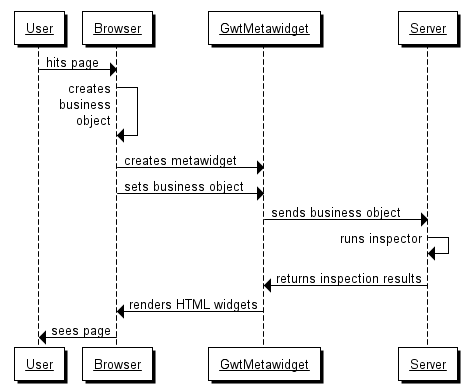
The process is:
-
instantiate the domain object on the client-side as normal (i.e. as JavaScript)
-
give the domain object to GwtMetawidget (a client-side, JavaScript GWT Widget)
-
GwtMetawidget uses AJAX to pass the business object to the server
-
the server, using Java, runs all the Inspectors (including reflection and annotations)
-
the server returns the inspection results as an XML document
-
GwtMetawidget uses JavaScript to render the HTML widgets
Note that steps 3 and 5 (the AJAX call to and from the server) are the most costly in terms of performance. Techniques to improve GWT performance are discussed in Section 9.5.4, “Rebinding”.
As noted in the section called “Reflection and Annotations” by default GwtMetawidget uses server-side inspectors. This allows the full power of Java-based reflection but carries the performance cost of an AJAX call. This cost can be mitigated by using rebinding (see Section 9.5.4, “Rebinding”), but there is another way: inspection can be performed client-side, with no AJAX calls.
Setting up a client-side Inspector is very easy. The default GwtMetawidget Inspector is GwtRemoteInspectorProxy, which is itself a client-side Inspector (one that makes a remote call to GwtRemoteInspectorImpl). To replace this default, simply implement your own Inspector:
public class MyClientSideInspector
	implements Inspector {
	public String inspect( Object toInspect, String type, String... names ) {
		return ...some XML string...
	}
}
Make sure this Inspector is located under the client folder of your GWT application so that it is compiled by the GWTCompiler into JavaScript. Use this Inspector by doing...
myGWTMetawidget.setInspector( new MyClientSideInspector() )
...which overrides the default GwtRemoteInspectorProxy. For an example of this technique see Section 1.4.9, “GWT Client Side Example”.
GWT Widgets do not distinguish between what a widget is versus how it is rendered. Instead, GwtMetawidget mimics this by providing loosely coupled Layout classes. Each Layout can further be configured by using LayoutConfig classes and standard CSS.
GwtMetawidget supports localization through the setDictionaryName method. This method takes a String containing the name of a JavaScript variable declared in the host HTML page. For example:
<script type="text/javascript">
	var bundle = {
	"add": "Add",
	"addBusiness": "Add Business Contact",
	"addPersonal": "Add Personal Contact"
};</script>
Keys are looked up based on the name of each business property.
metawidget.js is a pure JavaScript Metawidget. For an introduction to metawidget.js, see Section 1.2, “Part 1 (JavaScript version) - The First Metawidget Application”.
There are two steps to installing metawidget.js within a web application:
-
Add metawidget-core.min.js into /lib/metawidget/core.
-
Add a script tag to the top of your page:
<script src="lib/metawidget/core/metawidget-core.min.js" type="text/javascript"></script>
-
Optionally configure the Metawidget, as described below.
metawidget.js is preconfigured with sensible defaults. You can change this configuration by passing a JavaScript object to the metawidget.Metawidget constructor:
var mw = new metawidget.Metawidget( myElement, {
	inspector: ..., // Configure Inspector
	inspectionResultProcessors: [...], // Configure InspectorResultProcessors
	widgetBuilder: ..., // Configure WidgetBuilder
	widgetProcessors: [...], // Configure WidgetProcessors
	layout: ... // Configure Layout
} );
For advanced use cases, you can pass an array of configs. These will be applied in order:
var mw = new metawidget.Metawidget( myElement,
				[metawidgetConfig1, metawidgetConfig2] );
Configs support the following attributes:
| Attribute | |
|---|---|
| inspector | Set the Inspector to use |
| prependInspectionResultProcessors | Insert InspectionResultProcessors before any existing ones. Can be an array or a single InspectionResultProcessor |
| inspectionResultProcessors | Set the list of InspectionResultProcessors (replacing any existing ones) |
| appendInspectionResultProcessors | Append InspectionResultProcessors after any existing ones. Can be an array or a single InspectionResultProcessor |
| widgetBuilder | Set the WidgetBuilder to use |
| prependWidgetProcessors | Insert WidgetProcessors before any existing ones. Can be an array or a single WidgetProcessor |
| widgetProcessors | Set the list of WidgetProcessors (replacing any existing ones) |
| appendWidgetProcessors | Append WidgetProcessors after any existing ones. Can be an array or a single WidgetProcessor |
| layout | Set the Layout to use |
| styleClass | Set the CSS class of the top-level Metawidget, as well as any nested Metawidgets. This can be useful for adjusting the spacing of nested Metawidgets |
Look and feel can be customized using CSS. In addition, metawidget.js provides loosely coupled Layout classes. Some Layouts can further be configured by passing a JavaScript object:
new metawidget.layout.TableLayout( {
	numberOfColumns: 2,
	tableStyleClass: "my-table"
} );
metawidget.js will fire a buildEnd event upon completion of each build. Interested parties can use this to perform any special processing after the Metawidget is completely built.
Note that, for many use cases, clients may be better implementing WidgetBuilder.onEndBuild, WidgetProcessor.onEndBuild or Layout.onEndBuild instead. For example:
{
	onStartBuild: function( mw ) {
		// perform work before any widgets processed
	},
	processWidget: function( widget, elementName, attributes, mw ) {
		// process each widget
	},
	onEndBuild: function( mw ) {
		// perform work after all widgets processed
	}
}
Or for layouts:
{
	onStartBuild: function( mw ) {
		// perform work before any widgets laid out
	},
	startContainerLayout: function( container, mw ) {
		// perform work for new container
	},
	layoutWidget: function( widget, elementName, attributes, container, mw ) {
		// layout each widget
	},
	endContainerLayout: function( container, mw ) {
		// perform work to close container
	},
	onEndBuild: function( mw ) {
		// perform work after all widgets laid out
	}
}
Internally, metawidget.js uses JSON Schema as its inspection result format.
metawidget.js will automatically register itself as an HTML 5 Web Component using document.registerElement if available. This allows developers to use Metawidget with very little configuration. For example:
<!DOCTYPE HTML>
<html>
	<head>
		<script src="metawidget-core.min.js"></script>
		<style>
			#metawidget {
				border: 1px solid #cccccc;
				width: 250px;
				border-radius: 10px;
				padding: 10px;
				margin: 50px auto;
				display: block;
			}
		</style>
		<script>
			var person = {
				firstname: 'Homer',
				surname: 'Simpson',
				age: 36,
				save: function() {
					document.getElementById( 'metawidget' ).save();
					console.log( person );
				}
			}
		</script>
	</head>
	<body>
		<x-metawidget id="metawidget" path="person"></x-metawidget>
	</body>
</html>
The x-metawidget tag supports the following attributes:
| Attribute | |
|---|---|
| path | Path of the object to inspect. The path will be resolved in the global scope and supports simple namespace paths such as foo.bar |
| config | Optional path of an object to use to configure the Metawidget. Supports simple namespace paths such as foo.bar |
| readonly | Optional. Can be true or false |
The x-metawidget tag also supports the following methods:
| Method | |
|---|---|
| save | Saves the current values in the UI back into the object defined by path using SimpleBindingProcessor. This is a convenience method. To access other Metawidget APIs, clients can use getMetawidget instead |
| getMetawidget | Access the underlying Metawidget APIs |
metawidget-jqueryui.js wraps the JavaScript Metawidget into a JQuery UI component. For an introduction to metawidget.js, see Section 1.2, “Part 1 (JavaScript version) - The First Metawidget Application”.
There are three steps to installing metawidget-jqueryui.js within a web application:
-
Add metawidget-core.min.js into /lib/metawidget/core and metawidget-jqueryui.min.js into /lib/metawidget/jquery-ui
-
Add a script tag to the top of your page:
<script src="lib/metawidget/core/metawidget-core.min.js" type="text/javascript"></script>
<script src="lib/metawidget/jquery-ui/metawidget-jqueryui.min.js" type="text/javascript"></script>
-
Wrap Metawidget around a DOM element:
$('#metawidget').metawidget(); $('#metawidget').metawidget('buildWidgets', toInspect); -
Optionally configure the Metawidget, as described below.
metawidget-jqueryui.js is preconfigured with sensible defaults. You can change this configuration either at construction time:
$('#metawidget').metawidget( {
	layout: new metawidget.layout.SimpleLayout()
} );
Or by passing JQuery UI options:
$('#metawidget').metawidget('option','layout',new metawidget.layout.SimpleLayout());
Metawidget tries hard not to dictate your architecture. So although metawidget.js is predominantly a client-side technology, there are no restrictions on using it for server-side UI generation if you prefer.
Metawidget comes packaged as a Node.js module. Install it using:
npm install metawidget
The Metawidget module must be used in combination with a DOM implementation. This can either be jsdom, envjs, or even a simple implementation of your own (see test/render.js inside the Metawidget module for an example). Metawidget must be wrapped around a DOM element. The Metawidget constructor takes this element, and thereafter always uses element.ownerDocument rather than referencing any global document object.
See test/render.js inside the npm module for a full example how to use Metawidget. But briefly:
var metawidget = require( 'metawidget' );
...
var mw = new metawidget.Metawidget( yourElement );
mw.toInspect = {
	firstname: "Joe",
	surname: "Bloggs"
};
mw.buildWidgets();
...
// yourElement is now populated with child components
HtmlMetawidgetTag is a JSP taglib. For an introduction to HtmlMetawidgetTag, see Section 1.3.2, “Web Address Book”.
There are three steps to installing HtmlMetawidgetTag within a JSP application:
-
Add metawidget-all.jar into WEB-INF/lib.
-
Add a tag library descriptor to the top of your JSP page:
<%@ taglib uri="http://metawidget.org/html" prefix="m" %>
...
<m:metawidget value="foo"/>
...
Note that plain JSP doesn't provide any automatic management of domain objects. You must manually add objects (foo in the example above) into the scope. This can be done in several ways. The Address Book sample application uses embedded Java code:
<%
	...
	request.setAttribute( "contactSearch", contactSearch );
	...
%>
Alternatively, you could use the useBean tag:
<jsp:useBean id="foo" class="com.myapp.Foo"/>
-
Optionally configure the Metawidget, as described below.
HtmlMetawidgetTag is preconfigured with sensible defaults for JSP. You can change this configuration by creating a metawidget.xml file. By default HtmlMetawidgetTag looks for this file in WEB-INF, but you can configure its location in web.xml:
<context-param>
	<param-name>org.metawidget.jsp.tagext.CONFIG_FILE</param-name>
	<param-value>config/metawidget.xml</param-value>
</context-param>
Alternatively, you can specify an explicit config file at the tag level:
<m:metawidget value="foo" config="alternate-metawidget.xml"/>
JSP tag libraries do not distinguish between what a widget is versus how it is rendered. Instead, HtmlMetawidgetTag mimics this by providing loosely coupled Layout classes. Each Layout can further be configured by using LayoutConfig classes and standard CSS.
HtmlMetawidgetTag supports localization through a ResourceBundle set at the tag level:
<fmt:setBundle basename="org.metawidget.shared.allwidgets.resource.Resources" var="bundle"/>
<m:metawidget bundle="${bundle}"/>
Keys are looked up based on the name of each business property.
With regard to overriding widget creation, JSP lacks some component-based features. Specifically, whilst it is possible for JSP tags to reference their parent (using TagSupport.findAncestorWithClass), they have no way to enumerate their children. Therefore, it is not possible to directly support arbitrary child tags within HtmlMetawidgetTag. As a next best thing, Metawidget includes StubTag for wrapping arbitrary tags. It also supports wrapping arbitrary HTML. For example:
<m:metawidget value="contact">

	<m:stub value="communications">
		<table class="data-table">
			...
		</table>
	</m:stub>

</m:metawidget>
For an example, see Section 1.3.2, “Web Address Book”.
UIMetawidget is a Java Server Faces component. For an introduction to UIMetawidget, see Section 1.3.2, “Web Address Book” and Section 1.4.2, “Seam Example”.
There are four steps to installing UIMetawidget within a JSF application:
-
Add metawidget-all.jar into WEB-INF/lib.
-
Add a tag library descriptor to the top of your JSP page...
<%@ taglib uri="http://metawidget.org/faces" prefix="m" %>
...
<m:metawidget value="#{foo}"/>
...
...or Facelets page...
<ui:composition xmlns="http://www.w3.org/1999/xhtml"
	xmlns:m="http://metawidget.org/faces">
...
<m:metawidget value="#{foo}"/>
...
-
Optionally configure the Metawidget, as described below.
UIMetawidget is preconfigured with sensible defaults for JSF. You can change this configuration by creating a metawidget.xml file. By default UIMetawidget looks for this file in WEB-INF, but you can configure its location in web.xml:
<context-param>
	<param-name>org.metawidget.faces.component.CONFIG_FILE</param-name>
	<param-value>config/metawidget.xml</param-value>
</context-param>
Alternatively, you can specify an explicit config file at the tag level:
<m:metawidget value="#{foo}" config="alternate-metawidget.xml"/>
Or you can use JSF's binding attribute to configure Metawidget programmatically:
<m:metawidget value="#{foo}" binding="#{myBean.metawidget}"/>
Then in your managed bean:
public class MyManagedBean {

	public UIMetawidget getMetawidget() {

		// First-time init
		//
		// JSF spec: "When a component instance is first created (typically by virtue of being
		// referenced by a UIComponentELTag in a JSP page), the JSF implementation will retrieve the
		// ValueExpression for the name binding, and call getValue() on it. If this call returns a
		// non-null UIComponent value (because the JavaBean programmatically instantiated and
		// configured a component already), that instance will be added to the component tree that
		// is being created"

		UIMetawidget metawidget = new HtmlMetawidget();
		initMetawidget( metawidget );
		return metawidget;
	}

	public void setMetawidget( UIMetawidget metawidget ) {

		// POST-back init
		//
		// JSF spec: "When a component tree is recreated during the Restore View phase of
		// the request processing lifecycle, for each component that has a ValueExpression
		// associated with the name 'binding', setValue() will be called on it, passing the
		// recreated component instance"

		initMetawidget( metawidget );
	}

	private void initMetawidget( UIMetawidget metawidget ) {

		...configure Metawidget programmatically...
	}
}
This approach can also be used to inspect Objects and Classes directly, without a value binding:
<m:metawidget binding="#{myBean.metawidget}"/>
Then in your managed bean:
public class MyManagedBean {

	...as previous example...

	private void initMetawidget( UIMetawidget metawidget ) {

		metawidget.setValue( MyBusinessObject.class );
	}
}
One of JSF's most important Look and Feel technologies is CSS. Metawidget supports several approaches to suit different needs.
By convention, JSF's HTML widgets (HtmlInputText, HtmlSelectBooleanCheckbox, etc) define style and styleClass attributes for applying CSS styles and classes to their output. CssStyleProcessor follows this convention. When expanding to a single widget (such as an HtmlInputText) the style and styleClass attributes are applied to it. When expanding to multiple widgets, all widgets have the same style and styleClass attributes applied to them. This can be useful as a way to 'tag' every widget.
Another important JSF Look and Feel technology is Renderers. Whilst often Renderers are discussed in the context of rendering the same widget to different platforms (e.g. HTML or WML), they can equally be used to render the same widget to the same platform but in different ways. Renderers can be configured either per tag:
<m:metawidget ... rendererType="div"/>
Or globally in metawidget.xml:
<htmlMetawidget xmlns="java:org.metawidget.faces.component.html">
	<rendererType>
		<string>myRenderer</string>
	</rendererType>
	...
</htmlMetawidget>
HtmlTableLayoutRenderer is the default LayoutRenderer. It further defines parameters such as tableStyle, labelStyle and columnClasses (see the the section called “HtmlTableLayoutRenderer” for a complete list). The latter is a comma separated list of CSS style classes to be applied to table columns. The first style class is the label column, the second the widget column, and the third the 'required' column. Further style classes may be used for multi-column layouts. You can get quite far using, for example:
.table-component-column input { width: 100%; }
..this approach has the advantage of automatically applying to every widget, so overridden widgets do not have to explicitly set styleClass information. However, not all Web browsers support fine-grained CSS selectors such as...
.table-component-column input[type="button"] { width: auto; }
...in which case it may be better to switch to using styleClass on HtmlMetawidget itself.
Other supplied LayoutRenderers include div and simple (see Section 8.2.3, “JSF Layouts” for a complete list).
UIMetawidget supports localization through a ResourceBundle set either at the application level in faces-config.xml:
<faces-config>
	<application>
		<message-bundle>com.myapp.resource.Resources</message-bundle>
	</application>
</faces-config>
Or set at the tag level:
<m:metawidget bundle="#{myBean.bundle}"/>
By default, JSF's UIData component supports rendering data of type java.util.List, javax.faces.model.DataModel or Java arrays. UIMetawidget's HtmlWidgetBuilder respects this and will generate an HtmlDataTable for each type. It will decide UIColumns based on inspecting the List or array's component type for properties marked required (if any).
This will give a basic out-of-the-box representation of a Collection, but it is expected developers will ultimately define their own WidgetBuilder to represent a Collection to their preference. This may include: supporting java.util.Set; allowing inline editing; supporting pagination and so on. For more information, see this blog entry.
JSF f:facet tags can be used within m:metawidget tags to adorn layouts. The exact name and interpretation of the facet is at the discretion of the Layout. For example HtmlTableLayoutRenderer recognizes:
<m:metawidget value="...">
	<f:facet name="header">
		...instructions could go here...
	</f:facet>
	<f:facet name="footer">
		...button bar could go here...
	</f:facet>
</m:metawidget>
There is a special case when the m:metawidget's value resolves directly to a single widget, rather than iterating over properties and creating multiple sub-widgets (eg. if value is pointed directly at a String property it will resolve to an HtmlInputText). In this case any facets (and converters and validators) apply not to the Layout but to the generated widget. This can be useful to declaratively attach behaviours:
<m:metawidget value="#{foo.name}">
	<a4j:support event="onclick" onsubmit="alert('onclick')"/>
</m:metawidget>
Or:
<m:metawidget value="#{foo.name}">
	<f:validator validatorId="myValidator"/>
</m:metawidget>
If you are generating a single widget but still want the facet to apply to the Layout, wrap it in a parent m:metawidget that has no value:
<m:metawidget>
	<m:metawidget value="#{foo.name}" rendererType="simple"/>
	<f:facet name="footer">
		...button bar could go here...
	</f:facet>
</m:metawidget>
A parent m:metawidget with no value simply acts as a way to lay out children.
UIMetawidget supports JSF 2.0. It automatically detects whether JSF 2.0 classes are available (specifically javax.faces.event.PreRenderViewEvent) and switches to using them. However not all JSF 2.0 implementations properly support PreRenderViewEvent. You need at least Mojarra 2.1.7 (specifically a version that includes this fix) or MyFaces 2.0.3 (specifically a version that includes this fix). If you need to work with older versions, you must...
-
disable partial state saving by setting javax.faces.PARTIAL_STATE_SAVING to false in web.xml
-
disable PreRenderViewEvent support by setting org.metawidget.faces.component.DONT_USE_PRERENDER_VIEW_EVENT to true in web.xml; and
...but even then, Metawidget exercises the dynamic capabilites of JSF implementations more than most. If you start experiencing strange behaviour (such as components being re-ordered following POST back) upgrade to the latest version of JSF your environment permits.
By default, UIMetawidget does not rebuild widgets upon an AJAX request unless the Metawidget's Id is explicitly included in the list of execute Ids. There are several reasons for this:
-
Suppose a Metawidget X has children A, B and C. If B is executed by an AJAX request, this will trigger X with a PreRenderViewEvent (because it is the parent). But if X rebuilds A and C, and they weren't part of the execute request, their values will be lost. This is similar to how UIMetawidget doesn't rebuild upon a validation error
-
Similarly, if the Metawidget's backing bean is request-scoped, rebuilding A and C will mean they fetch their values from a new (likely empty) backing bean instance. There will be no opportunity for A and C to postback their values first (because they are not executed)
-
Some components (such as RichFaces' UIAutocomplete) do not allow fine-grained control over what is executed and rendered. They just execute and render themselves
-
AJAX is about performance, so typically clients are not wanting to rebuild large sections of the component tree
Although this default behaviour is safer it does, however, result in less dynamic UIs. Clients can use setBuildWidgetsOnAjaxRequest to override the default behaviour and instruct UIMetawidget to always rebuild widgets upon an AJAX request. Mechanisms such as conversation-scoped backing beans can be used to avoid losing values.
SpringMetawidgetTag is a Spring taglib. For an introduction to SpringMetawidgetTag, see Section 1.3.2, “Web Address Book”.
There are three steps to installing SpringMetawidgetTag within a Spring application:
-
Add metawidget-all.jar into WEB-INF/lib.
-
Add a tag library descriptor to the top of your JSP page:
<%@ taglib uri="http://metawidget.org/spring" prefix="m" %>
...
<m:metawidget path="fooCommand"/>
...
-
Optionally configure the Metawidget, as described below.
SpringMetawidgetTag is preconfigured with sensible defaults for Spring. You can change this configuration by creating a metawidget.xml file. By default SpringMetawidgetTag looks for this file in WEB-INF, but you can configure its location in web.xml:
<context-param>
	<param-name>org.metawidget.jsp.tagext.CONFIG_FILE</param-name>
	<param-value>config/metawidget.xml</param-value>
</context-param>
Alternatively, you can specify an explicit config file at the tag level:
<m:metawidget path="fooCommand" config="alternate-metawidget.xml"/>
JSP tag libraries do not distinguish between what a widget is versus how it is rendered. Instead, SpringMetawidgetTag mimics this by providing loosely coupled Layout classes. Each Layout can further be configured by using LayoutConfig classes.
SpringMetawidgetTag supports localization through a ResourceBundle set either at the application level in servlet.xml:
<beans>
	<bean id="messageSource" class="org.springframework.context.support.ResourceBundleMessageSource">
        <property name="basename">
        	<value>com.myapp.resource.Resources</value>
        </property>
    </bean>
</beans>
Or set at the tag level:
<fmt:setBundle basename="com.myapp.resource.Resources" var="bundle"/>
<m:metawidget bundle="${bundle}"/>
With regard to overriding widget creation, JSP-based technologies such as Spring lack some component-based features. Specifically, whilst it is possible for JSP tags to reference their parent (using TagSupport.findAncestorWithClass), they have no way to enumerate their children. Therefore, it is not possible to directly support arbitrary child tags within SpringMetawidgetTag. As a next best thing, Metawidget includes StubTag for wrapping arbitrary tags. It also supports wrapping arbitrary HTML. For example:
<m:metawidget path="contactCommand">

	<m:stub path="communications">
		<table class="data-table">
			...
		</table>
	</m:stub>

</m:metawidget>
For an example, see Section 1.3.2, “Web Address Book”.
StrutsMetawidgetTag is a Struts taglib. For an introduction to StrutsMetawidgetTag, see Section 1.3.2, “Web Address Book”.
There are three steps to installing StrutsMetawidgetTag within a Struts application:
-
Add metawidget-all.jar into WEB-INF/lib.
-
Add a tag library descriptor to the top of your JSP page:
<%@ taglib uri="http://metawidget.org/struts" prefix="m" %>
...
<m:metawidget property="fooForm"/>
...
-
Optionally configure the Metawidget, as described below.
StrutsMetawidgetTag is preconfigured with sensible defaults for Spring. You can change this configuration by creating a metawidget.xml file. By default StrutsMetawidgetTag looks for this file in WEB-INF, but you can configure its location in web.xml:
<context-param>
	<param-name>org.metawidget.jsp.tagext.CONFIG_FILE</param-name>
	<param-value>config/metawidget.xml</param-value>
</context-param>
Alternatively, you can specify an explicit config file at the tag level:
<m:metawidget property="fooForm" config="alternate-metawidget.xml"/>
JSP tag libraries do not distinguish between what a widget is versus how it is rendered. Instead, StrutsMetawidgetTag mimics this by providing loosely coupled Layout classes. Each Layout can further be configured by using specific param tags.
StrutsMetawidgetTag supports localization through a ResourceBundle set either at the application level in struts-config.xml:
<struts-config>
	<message-resources parameter="com.myapp.resource.Resources" null="false"/>
</struts-config>
Or set at the tag level:
<fmt:setBundle basename="com.myapp.resource.Resources" var="bundle"/>
<m:metawidget bundle="${bundle}"/>
With regard to overriding widget creation, JSP-based technologies such as Struts lack some component-based features. Specifically, whilst it is possible for JSP tags to reference their parent (using TagSupport.findAncestorWithClass), they have no way to enumerate their children. Therefore, it is not possible to directly support arbitrary child tags within StrutsMetawidgetTag. As a next best thing, Metawidget includes StubTag for wrapping arbitrary tags. It also supports wrapping arbitrary HTML. For example:
<m:metawidget property="contactForm">

	<m:stub property="communications">
		<table class="data-table">
			...
		</table>
	</m:stub>

</m:metawidget>
For an example, see Section 1.3.2, “Web Address Book”.
VaadinMetawidget is a Vaadin CustomComponent. For an introduction to VaadinMetawidget, see Section 1.3.2, “Web Address Book”.
There are two steps to installing VaadinMetawidget within a Vaadin application:
-
Add metawidget-all.jar into WEB-INF/lib.
-
Optionally configure the Metawidget, as described below.